
Context Window Details
What is Context Window
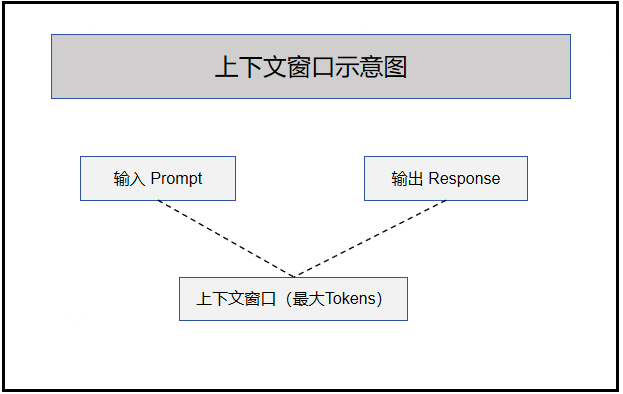
Context window refers to the maximum number of tokens a model can process in a single request, including both input (Prompt) and output (Response).
doubao-seed Series Model Context Windows
| Model ID | Context Window (token) | Max Input (token) | Max Output (token) |
|---|---|---|---|
| doubao-seed-2-0-pro-260215 | 256K | 256K | 128K |
| doubao-seed-2-0-lite-260215 | 256K | 256K | 128K |
| doubao-seed-2-0-mini-260215 | 256K | 256K | 128K |
| doubao-seed-2-0-code-preview-260215 | 256K | 256K | 128K |
| doubao-seed-1-8-251228 | 256K | 224K | 32K |
| doubao-seed-code-preview-251028 | 256K | 224K | 32K |
| doubao-seed-1-6-lite-251015 | 256K | 224K | 32K |
| doubao-seed-1-6-flash-250828 | 256K | 224K | 32K |
| doubao-seed-1-6-vision-250815 | 256K | 224K | 32K |
| doubao-seed-1-6-251015 | 256K | 224K | 32K |
Impact of Context Window on Model
1. Input Length Affects Available Output Space
Context window: 4096 tokens

Scenario A: Simple task
├── Input: 100 tokens
└── Available output: 3996 tokens ✅ Ample

Scenario B: Medium task
├── Input: 3500 tokens
└── Available output: 596 tokens ⚠️ Limited

Scenario C: Long text task
├── Input: 4000 tokens
└── Available output: 96 tokens ❌ Almost no output
2. Attention Decay Phenomenon
As sequence grows, model's attention to early content gradually decreases:
Input: [User Q] [Background 1] [Background 2] ... [Latest]
       ↑
     Strong                               Weak
    Attention                            Attention
Potential Issues:
- Ignoring important instructions at the beginning
- Forgetting background information in the middle
- Incorrectly citing content sources
3. Theoretical Challenges of Long Context
| Challenge | Description |
|---|---|
| Computational Complexity | Self-attention computation is proportional to sequence length squared |
| Memory Usage | KV Cache grows linearly with sequence length |
| Communication Overhead | Cross-node data transfer increases in distributed inference |
Application Scenario Recommendations
Short Context Scenarios (≤ 32K)
| Scenario | Recommended Reason |
|---|---|
| Customer Service | Single-turn interaction, concise response |
| Simple Q&A | Single task, no long background needed |
| Text Completion | Short text generation |
| Code Generation | Function-level code, snippet output |
Medium Context Scenarios (64K - 128K)
| Scenario | Recommended Reason |
|---|---|
| Document Analysis | Can analyze 10-20 page PDFs |
| Multi-turn Chat | Retain multi-turn conversation history |
| Code Debugging | Include complete file context |
| Content Creation | Medium-long article writing |
Long Context Scenarios (> 128K)
| Scenario | Recommended Reason |
|---|---|
| Long Novel | Can process entire chapter content |
| Codebase Understanding | Analysis of entire files |
| Book Summary | Summarize entire books |
| Knowledge Base Q&A | Large document retrieval augmentation |
Parameter Configuration Recommendations
max_tokens Parameter
Control the maximum number of output tokens:
python
response = client.chat.completions.create(
    model="gpt-4o",
    messages=[
        {"role": "user", "content": "Explain quantum computing in detail"}
    ],
    max_tokens=2000
)
Scenario-based Configuration
| Scenario | Recommended max_tokens | Description |
|---|---|---|
| Brief Q&A | 300-500 | Concise answer |
| Standard Q&A | 1000-2000 | Complete answer |
| Detailed Explanation | 3000-4000 | In-depth analysis |
| Long Writing | 5000-8000 | Article output |
Configuration Guidelines
Recommended formula:
max_tokens = Context window × 0.4 ~ 0.5

Example (128K window):
max_tokens ≈ 50000 ~ 64000

Note: Reserve space for input, recommended not to exceed 50% of window
Strategies for Exceeding Limits
1. Chunking
Applicable for long document analysis, book summarization:
python
def process_long_document(text, chunk_size=4000, overlap=200):
    chunks = []
    tokens = text.split()

    for i in range(0, len(tokens), chunk_size - overlap):
        chunk = ' '.join(tokens[i:i + chunk_size])
        chunks.append(chunk)

    return chunks
2. Summarization Compression
Applicable when multi-turn conversation history is too long:
python
def summarize_conversation(messages, max_tokens=4000):
    summary_prompt = f"""Summarize the following conversation into key points,
controlled within {max_tokens} tokens:

{messages}

Summary:"""

    summary = call_llm(summary_prompt)
    return [
        {"role": "system", "content": "Previous conversation summary: " + summary},
        messages[-1]
    ]
3. Retrieval Augmented (RAG)
Applicable for scenarios requiring processing massive knowledge:
User Question ──→ Retrieve ──→ Relevant Docs ──→ Build Prompt ──→ LLM Inference
                                ↑
                          Only most relevant excerpts
Best Practices
1. Important Information Placement
- Place key instructions at the beginning or end
- Use structured format to highlight key points
2. Choose Model Based on Task
| Task Type | Recommended Model | Reason |
|---|---|---|
| Short Chat | GPT-4o-mini | Fast and low cost |
| Document Analysis | Claude 3.5 | Long context support |
| Ultra-long Tasks | Gemini 3 Pro | Million-level context |
3. Monitoring and Optimization
python
def estimate_tokens(text):
    return len(text.split()) * 1.3

def check_context_usage(prompt, max_tokens, context_window):
    estimated = estimate_tokens(prompt)
    available = context_window - max_tokens
    usage_ratio = estimated / available

    if usage_ratio > 0.9:
        return "warning"
    return "ok"
FAQ
Q: Why is output truncated?
Possible reasons:
max_tokensset too small- Context window is full
Q: How to avoid "forgetting" issues?
- Place important information at the beginning or end of input
- Use structured format to highlight key points
- Use chunking for ultra-long tasks
Q: Is larger context window always better?
Not necessarily. Larger context brings higher latency and cost, and too long context may reduce attention to middle sections. Recommended to choose the appropriate model based on actual tasks.