Trae IDE Configuration Guide
What is Trae IDE
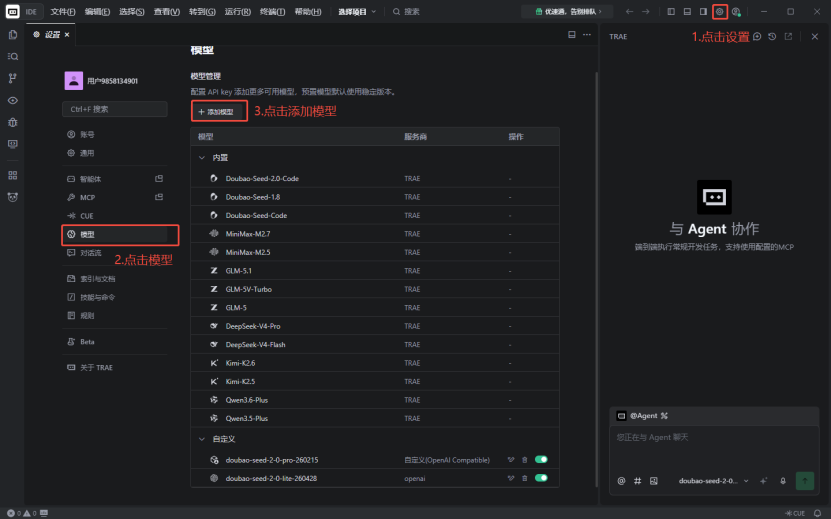
Trae IDE is an AI programming assistant developed by ByteDance that supports connecting to third-party APIs through the built-in Cline plugin.
Note
Trae IDE itself has removed the official entry for custom service providers and custom Base URL, only supporting built-in partner models. Using the Cline plugin is the only viable solution.
Install Cline Plugin
- Open Trae IDE
- Click the Extensions icon in the left activity bar
- Search for Cline (look for the official fox logo)
- Click Install
Configure API
1. Get API Key
- Log in to ai.TokenHub dashboard
- Go to "API Keys" page
- Click "Add Key" to get your API Key (starts with
sk-)
2. Configure Cline
- Click the Cline icon in the left activity bar of Trae IDE
- Go to Settings page
- Find the API Configuration section
- Select Custom API Endpoint
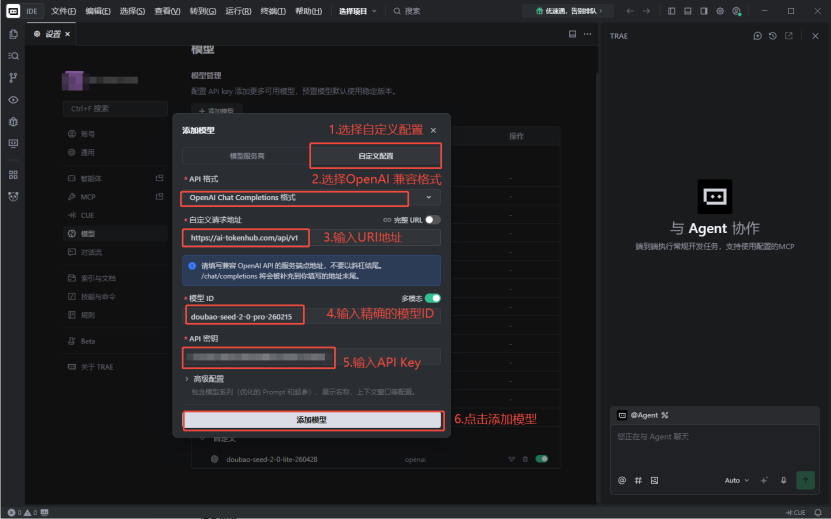
3. Fill in Configuration
| Parameter | Value | Description |
|---|---|---|
| Base URL | https://ai-tokenhub.com/v1 | API service address |
| API Key | sk-xxxxxxxxxxxxxxxx | Your API key |
| Model ID | claude-sonnet-4-20250514 | Model name to use |
Note
Model ID must exactly match the supported model name on ai.TokenHub platform, case-sensitive. You can view the available models on the platform's "Models" page.
4. Save Configuration
After filling in the configuration, click Save. The configuration takes effect immediately without restarting Trae IDE.
Common Configuration Examples
Claude Model
| Parameter | Value |
|---|---|
| Base URL | https://ai-tokenhub.com/v1 |
| Model ID | claude-sonnet-4-20250514 |
GPT Model
| Parameter | Value |
|---|---|
| Base URL | https://ai-tokenhub.com/v1 |
| Model ID | gpt-4o |
DeepSeek Model
| Parameter | Value |
|---|---|
| Base URL | https://ai-tokenhub.com/v1 |
| Model ID | deepseek-v3 |
Plugin Automation Settings
In Cline Settings, you can configure the plugin's automation behavior:
- Auto-approve: Set whether to automatically approve file read/write and security commands
- It is recommended to configure carefully according to your needs to avoid security risks
FAQ
Request Failed 404
Check if Base URL is correct, no extra / at the end.
Authentication Failed 401
Check if API Key is correct, ensure no extra spaces or characters.
Model Not Found
Ensure Model ID exactly matches the supported model name on the platform, case-sensitive.
Network Connection Timeout
Check network connectivity and ensure you can access https://ai-tokenhub.com.