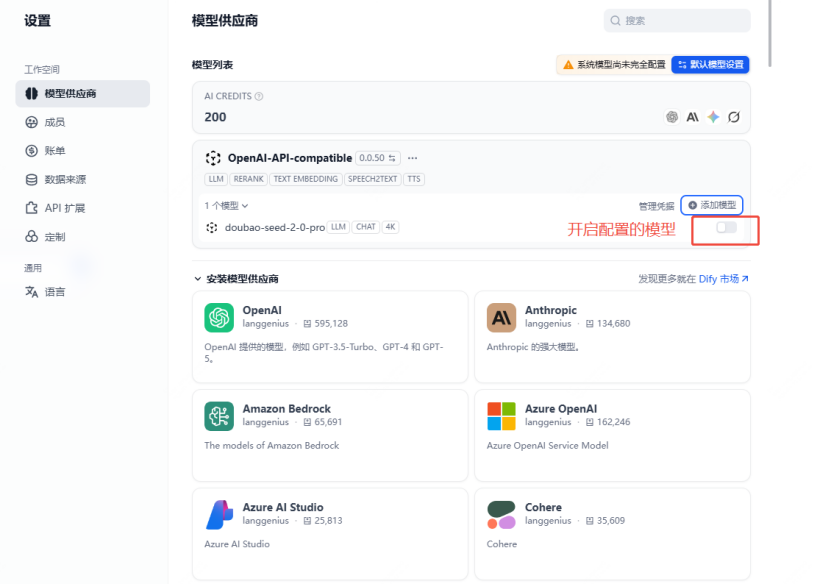
Dify Configuration
What is Dify
Dify is an open-source AI application development platform that supports building AI workflows, chatbots, and Agent applications through a visual interface.
Configure ai.TokenHub
Dify supports OpenAI-compatible protocol and can directly configure ai.TokenHub as a model provider.
Configuration Steps
1. Go to Model Provider Settings
- Log in to Dify dashboard
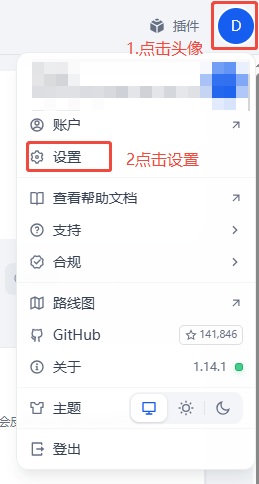
- Click avatar → Settings
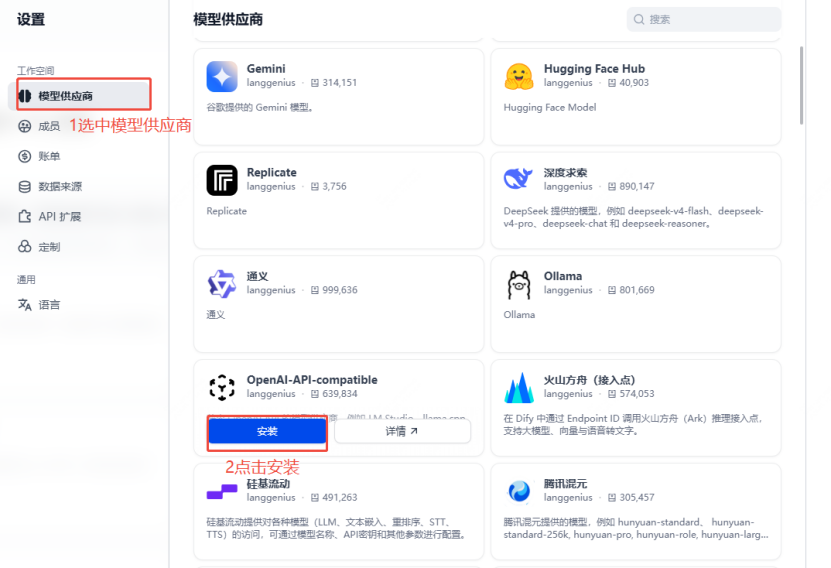
- Select Model Providers from left menu
2. Add OpenAI-API-compatible
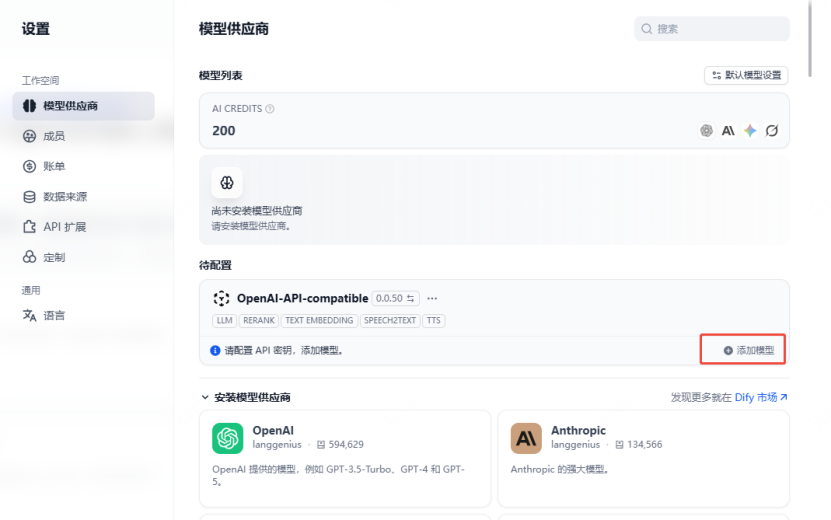
- Find OpenAI-API-compatible in the provider list
- Click Add Model
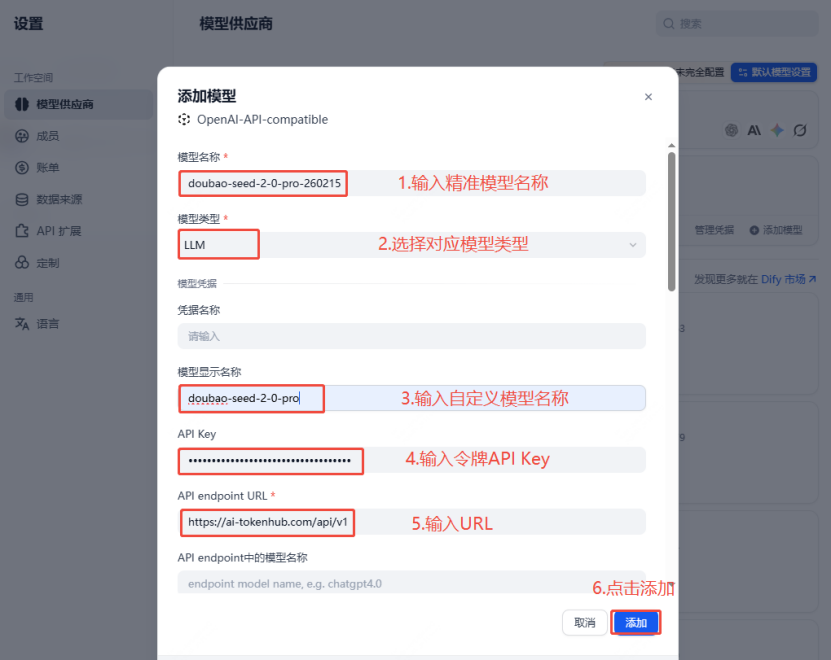
3. Fill in Configuration
| Parameter | Value |
|---|---|
| Model Name | gpt-4o (or your desired model ID) |
| API Key | Your ai.TokenHub API Key |
| API Base URL | https://ai-tokenhub.com/v1 |
4. Set Model Parameters
| Parameter | Recommended Value |
|---|---|
| Context Window | 128000 |
| Max Tokens | 16384 |
| Streaming | ✅ Enabled |
| Function Calling | ✅ Supported (if needed) |
| Vision | ✅ Supported (if using multimodal models) |
5. Save and Test
After saving, click the Test button next to the model name to send a test message.
Multi-Model Configuration
Add Claude Models
Repeat the above steps, fill in Model Name:
| Model | Model Name |
|---|---|
| Claude 3.5 Sonnet | claude-3-5-sonnet-20241022 |
| Claude 3 Opus | claude-3-opus-20240229 |
Complete Configuration Example
| Model | Model Name | API Base URL |
|---|---|---|
| GPT-4o | gpt-4o | https://ai-tokenhub.com/v1 |
| GPT-4o-mini | gpt-4o-mini | https://ai-tokenhub.com/v1 |
| Claude 3.5 Sonnet | claude-3-5-sonnet-20241022 | https://ai-tokenhub.com/v1 |
| Gemini 3 Pro | gemini-3-pro | https://ai-tokenhub.com/v1 |
Python Verification Script
Before configuring in Dify, you can verify API connectivity with Python:
python
from openai import OpenAI
client = OpenAI(
api_key="your_api_key",
base_url="https://ai-tokenhub.com/v1"
)
response = client.chat.completions.create(
model="gpt-4o",
messages=[
{"role": "user", "content": "Hello, test connectivity"}
],
stream=True
)
for chunk in response:
if chunk.choices[0].delta.content:
print(chunk.choices[0].delta.content, end="", flush=True)FAQ
Extra slash at the end of Base URL
❌ Wrong: https://ai-tokenhub.com/v1/ ✅ Correct: https://ai-tokenhub.com/v1
Model Name is Case Sensitive
Ensure the model name matches exactly with the model ID on the ai.TokenHub platform.
Request Failed 404
Check if the Base URL is correct, no extra / at the end.
Docker Deployment Dify
bash
git clone https://github.com/langgenius/dify.git
cd dify